Month: March 2012

Free setup assistance for your free Purchase Order Software

We’ve had a few requests to help new users of the free Purchase Order Software with the setup (configuration) of the system.

Sure, we’re happy to help.

SpendMap includes an easy-to-use Setup Wizard and detailed online help, but if you’re in a hurry and don’t have time to read it, we would be happy to walk you through it.  Just send us a note at free-procurement@spendmap.com and we’ll set up a short meeting.  It should only take 15 or 20 minutes to get you set up and processing Purchase Orders.

We may not be able to provide this free service forever but we’ll try as long as we can until the user community gets too big.  Mind you, by then we’ll likely have a user forum in place, so you’ll be able to help each other at that point.

Hope to hear from you soon…
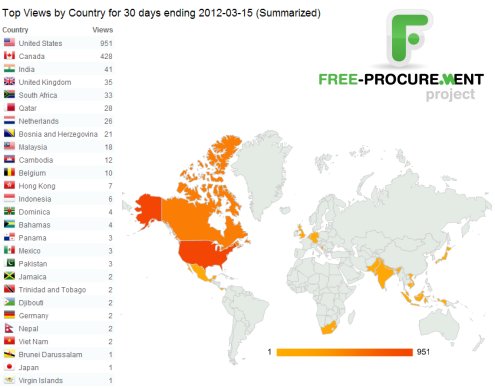
30 Day Results: The world loves free Purchase Order software

The results are in for the first month.  People all over the world are downloading our free Purchase Order Software. 

We’re getting some great questions from the early adopters who are already implementing the system and we’re getting ready to announce even more free stuff to help you say “Goodbye” to those paper Purchase Orders and frustrating manual Purchasing processes, once and for all.

So please keep the feedback coming and make sure to sign up for this Blog to stay in the loop.

The World Loves Free Purchase Order Software

When a PO is just a PO

We still see it from time to time; the 13-digit PO number.  You know, first you take an incrementing PO number, then you jam the date at the front, stick on the cost center or job number, and maybe sprinkle in the Buyer’s initials for good measure.

If you’re coming from a manual, paper-based process to manage your Purchase Orders, you wouldn’t be the only one to use your PO numbers for purposes other than identifying the order.  After all, when all you have to rely on to track your spending history is a filing cabinet, what other alternatives are there?

(more…)

How to get internal support for a full Purchasing Software System

We’re positioning the Free-Procurement Project as free “Purchase Order software” for a bunch of reasons that I won’t go into here but the free version of SpendMap actually includes all 12 modules, including requisitioning, receiving, supplier invoice approval, even inventory control and asset management.

If all you want to do is automate your Purchase Orders, that’s fine – just stick with the Purchasing Module.  The functionality is compartmentalized, so you don’t need to use all features/modules if you don’t want to.

But if you’re up for it, you can use SpendMap to automate everything from initial requisition all the way through to the approval of the supplier’s invoice and integration with your Accounts Payable system.  This is commonly referred to as “req-to-check” or “purchase-to-pay” (P2P for short).

If you intend to branch out into these other optional areas, however, you should be prepared to present a business case to decision makers and other departments that will be affected, such as the folks in Accounts Payable, department managers who will be approving orders online, perhaps even end-user staff members (requisitioners).

To help you get started building a business case, here’s a list of how e-procurement software can improve your business results at each step of the procurement process…

(more…)

Alternatives to using item catalogs

When our customers first see what can be done with the Item Master File (item catalog) in SpendMap, their first reaction is usually elation.  They love that they can put a list of approved items in front of their Requisitioners and Buyers, they love how most of the data entry goes away (item descriptions, pricing, account coding, etc. will default on new orders based on the selected item), and they love how they can run reports to get accurate spending history by part number.

But at some point the reality sets in and then comes the inevitable “You mean I have to set up all that item information?”.

So this post outlines some options for (and alternatives to) maintaining item catalogs in SpendMap.

(more…)