Update for v14.50 (accumulated fixes)

A patch has been posted to correct various minor issues in version 14.50 of the free version of SpendMap.

Please select the menu HELP > CHECK FOR UPDATES from within SpendMap to update your system.

This is a “patch” only (i.e. not a full version upgrade), so it will not change any features and your system will remain at version 14.50.

If you have any questions, please use our free support ticket system.

Comparing the Free and Pro Versions of SpendMap

We’ve been getting quite a few questions about the differences between the Free and Pro Versions of SpendMap, so we put together this little video for you…

You can try our Pro Version in the Cloud here.
And you can download a copy of the Free Version here.

Inventory Control in Pro Version of SpendMap

Are you thinking about upgrading to the Pro Version of SpendMap so that you can manage your inventory in the system?

Did you know that SpendMap offers two separate modules for Consumable Inventory Control and Fixed Asset Management?

Check out these new video tutorials to learn more…

And if you’d like to try it out for yourself, just sign up for our Free Cloud Demo.

Approving Supplier Invoices the Easy Way

Are you looking for an easier way to approve your suppliers’ invoices for payment?  Tired of all the paperwork, phone calls and emails?

SpendMap’s Invoice Approval and A/P Interface Module really simplifies the process.

Check out our new video tutorial, below.  Or better yet, take a free test drive of our Pro Version and see for yourself.

Manual PO Numbers in your Free Purchase Order Software

By default, the Free Version of SpendMap will automatically assign incrementing PO numbers to each new Purchase Order that you enter in the system.  You can set up your “Next PO number” during the Setup Wizard that runs automatically when you log into your Live System for the first time.

But if you prefer to enter your PO numbers manually for each new order, just select the following menu in SpendMap…
– PURCHASING > Setup system > Incrementing document number sets > POs

Then modify PO Number Set A as follows.  From that point on, whenever you enter a new PO in your PO Work Area, the PO Number will be blank and you can enter it manually for each order.

Time-Based and Overall Budgets in your Free Purchase Order Software

Hanna is the Purchasing Manager at a construction company in California and asked about setting up budgets for her departments and jobs…

“When a department buys something, like a computer or office supplies for example, it goes against their monthly budget but when we buy something for one of our jobs, the budget can span several months in some cases.”

No problem Hanna, you can track both “time-based” and “overall” budgets in SpendMap.

For your time-based budgets, you would typically allocate funds by month, quarter or year but when you allocate an overall budget to a project or a job, that budget will be available for the life of the project, regardless of how long that takes.

Theoretically an individual Cost Center (department, project, job, etc.) could have both time-based budgets and an overall budgets but that’s pretty unusual.  Typically it’s one or the other.

You can enter both time-based and overall budgets in the Cost Center Master File…
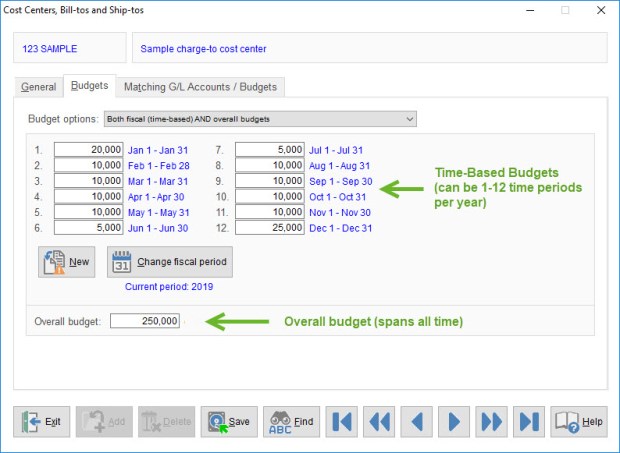
Budgets in Purchase Order Software

Adding Fields to Excel Reports in your Free Purchase Order Software

Colton works in the agriculture industry and called to ask if he could add additional fields/columns to the PO Listing Report spreadsheet.

By default, that particular report/spreadsheet includes only the supplier code/ID for each Purchase Order but not the supplier name or other contact information.

So, we showed him how he can add any field from the Supplier Master File and within seconds, he had modified his spreadsheet to show the missing information.

Want to see how he did it?  Check out this video tutorial for all the details…

Pop-Up Calculator in your Free Purchase Order Software

Hey Spend-Mappers,

Did you know that the Free Version of SpendMap includes a convenient pop-up calculator?

Just right-mouse click on any numeric field in SpendMap and select “Calculator” from the menu…

pop-up-calculator

Free Lunch and Free Purchase Order Software

It’s pretty cool that you pay no money at all for software that saves your company money.

Whoever said “There’s no such thing as a free lunch” must not have heard about the Free Version of SpendMap.

Purchase Order Management can be Scary for SMBs!

Where is all the money going?  Will we have enough to meet our commitments?  Who bought all this Halloween candy?!?

Get control of your company’s spending and see where the money is going, with SpendMap’s free Purchase Order Management Software.

Happy Halloween everyone!