free

Important update for your free Purchase Order Software

If you have successfully installed the free version of SpendMap and the system is able to check for updates when starting up, you can ignore this blog post.
 
As you may know, the free version of SpendMap checks for updates/patches automatically.  When an update is available, it is downloaded automatically and you will receive a message to re-launch the system.  This ability to automatically update/patch the system is absolutely mandatory for a project like this, due to the large number of free systems in use.
 
Unfortunately, we’ve had a few support tickets from people who are not able to activate and/or update the software due to restrictions on their firewalls or proxy servers, so we have redesigned the auto-update utility in the hopes of making it more “firewall friendly”.
 
Like all updates/patches, the updated version will be downloaded and installed automatically the next time you run SpendMap.  However, if you are having trouble connecting to our update server, obviously you won’t get the update.
 
So, if you have SpendMap running but are not able to apply auto-updates, you can download the new version manually with this file…
http://www.spendmap-updates.com/updates/free1164/patch.zip 
 
TIP: If you are not sure if your SpendMap system is able to auto-update, you can test this by selecting the menu option Help > Check for updates – If it is unable to check for updates, you will receive an error message.

Instructions for IT person or System Administrator:  After backing up the system, just unzip the patch.zip file into the root folder of each of your SpendMap systems.  For example, if you’re using both the Evaluation and Live systems, you’ll need to unzip this twice, into both of these folders (the example below assumes that you installed SpendMap into the default folder of C:\FREEPROCUREMENT)…
 
C:\FREEPROCUREMENT\Eval
C:\FREEPROCUREMENT\Live
 
If, however, you were not able to get SpendMap going in the first place, you can just download a new SETUP.EXE (which has the new auto-update feature built-in) and install the system from scratch…
http://www.spendmap.com/Register_Download 
 
For clarity, if you are installing from scratch, there is no need to download and apply the patch.zip file, as its contents are already included in the SETUP.EXE.
 
Finally, if the new update utility does not improve things for you and SpendMap is still not able to check for updates due to restrictions on your firewall or proxy server, as a last resort you can manually download and install the patch.zip file from time to time.  Any new or updated files will be added to the ZIP file accumulatively, so you can download and install the files as often as you like, perhaps once a month, or if we make a post like this in the future about an important update.  To make sure that you are notified about important updates, please follow our blog.

Limits on free Purchase Order Software

My credit card number was stolen a few weeks ago and my bank issued me a new card.  They also lowered my credit limit (to reduce the chance of fraud going forward, I guess) but without notifying me, so naturally I was surprised when my card was declined at a gas station over the weekend.  To make things worse, a $25 “over limit fee” shows up on my statement.  So they lower my limit without notice and then charge me for using their service.  Very nice.

Recently we’ve had quite a few questions about the “limits” on the free version of SpendMap.  Despite our best efforts to explain that the software is totally free, quite a few of you are still calling it the “demo” version and asking about the limitations in the free software, like if there are limits on the number of suppliers or items you can add, or how many Purchase Orders you can process, or how long the trial period is.

There are no limits.  It’s totally free.  Forever and always.  Really.  Really really!

The only limits are those that are imposed by the technology itself.  Since it is a desktop application, it’s not really suitable for a large number of users.  If you need to roll out your e-procurement system to hundreds or thousands of users, you should really be looking at our web-based system.

The only other limit, if you can call it that, is the limit on what you can accomplish on your own with the software, in between the duties of your regular business day.  But if you don’t have time for a do-it-yourself e-procurement project, we’re offering an affordable Service Plan so that you can directly engage our Client Services Team to make faster progress.

And no, there won’t be any surprise charges when you cut your 100th PO.

Q1 Results: Free Purchase Order software is spreading around the world

The long weekend here in Toronto was a great chance to reflect on our accomplishments and make plans for even better things to come.

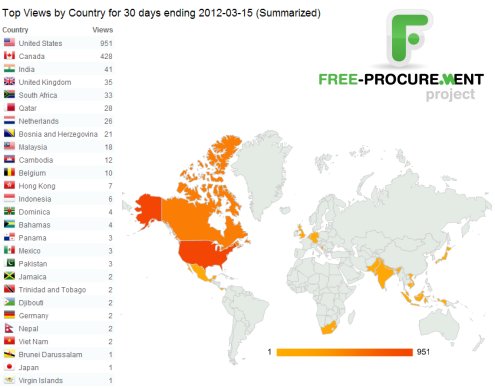
For those of you that are following the Free-Procurement Project, I thought you might be interested to see our progress for the first three months…

For comparison, here’s what it looked like two months ago.

We put our money where our mouth is with free Purchase Order Software

It’s fitting, don’t you think, that you pay no money at all for this software that’s used to save you money (i.e. control your spending).

Talk about putting your money where your mouth is.

Free setup assistance for your free Purchase Order Software

We’ve had a few requests to help new users of the free Purchase Order Software with the setup (configuration) of the system.

Sure, we’re happy to help.

SpendMap includes an easy-to-use Setup Wizard and detailed online help, but if you’re in a hurry and don’t have time to read it, we would be happy to walk you through it.  Just send us a note at free-procurement@spendmap.com and we’ll set up a short meeting.  It should only take 15 or 20 minutes to get you set up and processing Purchase Orders.

We may not be able to provide this free service forever but we’ll try as long as we can until the user community gets too big.  Mind you, by then we’ll likely have a user forum in place, so you’ll be able to help each other at that point.

Hope to hear from you soon…

30 Day Results: The world loves free Purchase Order software

The results are in for the first month.  People all over the world are downloading our free Purchase Order Software. 

We’re getting some great questions from the early adopters who are already implementing the system and we’re getting ready to announce even more free stuff to help you say “Goodbye” to those paper Purchase Orders and frustrating manual Purchasing processes, once and for all.

So please keep the feedback coming and make sure to sign up for this Blog to stay in the loop.

The World Loves Free Purchase Order Software

Your Free Purchase Order Software is Here

Did you hear the “pop”?  That was us celebrating the arrival of the world’s first free e-procurement system.

You can download your copy here.

We’ve tried to predict your questions and we put that knowledge into the online help system and the first round of tutorial videos.  But we aren’t expecting to hit a home run right out of the gate, so please send us your feedback and let us know what else we can do to help.

And don’t forget to sign up for this Blog.  As we add to the software and our library of tutorials or other resources, we’ll be making blog posts to let you know that there’s something new to help.  If you don’t follow the blog, you won’t find out about the new stuff.

Thanks again for trying the free version of SpendMap!

Support System Now Online

The new support system is now online, so you can get free support for your free software.

I know, I know, you need the software before you need support.  We’re almost there.  Just working through a couple issues with the installer program, to make it as easy as possible for everyone to get the system up and running.

So in the meantime, while our developers are putting the bow on the package, the rest of us have had an opportunity to tie up some loose ends, like the new support system, finishing up a couple sections of the Online Help, and so on.

So the whole package will be a bit more polished, which I think you’ll all appreciate.

Hang in there everyone…we’re very close.

Free Software Rocks

Just finished setting up the blog/website for the project (this blog/website I mean). 

I say “blog/website” because the lines are pretty blurry.  It’s amazing how much you can do with this free WordPress software.

Hopefully our Free-Procurement customers will be equally as impressed with what they can accomplish with the free Purchasing Software.