purchase order software

Who’s Ready to Upgrade their Free Purchase Order Software?

We’re starting to roll-out the 2016 Release of SpendMap, version 14, including more than 30 new features and capabilitiesNew Version of SpendMap

We’re looking for a few “early adopters” to try out the new release before we make it available to the rest of the Free-Procurement community.

So what do you say?  Would you like to give v14 a try?  The upgrade utility will bring forward all your data, history, settings, etc., so you will not lose any of your work in SpendMap.

Please send an e-mail to free-procurement@spendmap.com and we will reply with instructions for upgrading your system.

We think you’re going to like this one 🙂

Hope to hear from you soon!

Cool New Stuff Coming to your Free Purchase Order Software

We’re getting ready to roll out the 2016 release of SpendMap, version 14.

Don’t miss any of the important announcements – follow our Blog using the field on the right side of this page.  You can unsubscribe any time.

There’s lots of cool new stuff coming your way soon, including new Excel-based reports that you can add additional fields/columns to, new and improved budget tracking features, attachment capability to complement the internal notes in the Item and Supplier Master Files, and much more.

We can’t wait either!


Finding answers about your Free Purchase Order Software

Chris works at a construction and maintenance services company in the United Kingdom and was asking about something that we wrote about a few months ago.

Of course we love to hear from anyone who has a question about their free Purchase Order Software but did you know that you can often find answers to your questions right here on this Blog?

To search for a topic, try clicking on the little “magnifying glass” at the right side of the menu at the top of the page or using the “Search Posts” widget in the right sidebar.

Catch a friend a fish and you feed them for a day…show a friend how to fish and you feed them for life!

fishing-for-answers in free PO software

Is your free Purchase Order Software a bit too loud?

After all that New Year’s fun, you might want to turn the volume down a bit in your free Purchase Order software.

To disable the warning/notification sounds in SpendMap, just use the Workstation Setting for “Audible Prompts (beeping)“, in here…
– PURCHASING > Setup system > Workstation configuration settings

In v12.65 it is setting #4 but in v14 (coming soon) we moved it to #12.

No-Sound


Free Purchase Order Software is like nuts in the shell

Ever notice how those Christmas nuts (in the shell) taste better?  Having to do a little work somehow makes the victory that little bit sweeter.

It’s kind of like the free version of SpendMap.  Sure, you’ll have to do some reading and maybe watch some video tutorials, but it’ll sure be sweet to have a totally free Purchase Order system up and running in the new year.

Or if you prefer your treats ready-to-eat, please call us to learn about the paid/commercial version of SpendMap, which comes with a full range of professional services like one-on-one training and implementation consulting.  We would be happy to crack the shells for you so that you can just dig in.

Ho-ho-ho.

xmas-nuts-green

Can’t see your free Purchase Order Software?

The free version of SpendMap can show you where the money is going.  But only if you can read the screens!

If you would like to make the screens a bit bigger in your free Purchase Order Software System, try using setting #10 (Font/Screen Scaling Factor) in here…
– PURCHASING > Setup system > Workstation configuration settings

Visibility and free Purchase Order Software

Popular Videos for Buyers and Purchasing Managers

Our YouTube Channel is approaching 80,000 views.

And the video that reviews our Free Purchase Order Software is about to hit 25,000 views itself.

Aside from helping you implement the free version of SpendMap, our video tutorials are a good way to learn about the benefits of e-procurement software in general.

Thanks for  your time and interest.

– The Free-Procurement Project Team

Youtube-SM-logos

Testing Your Free Purchase Order Software

Todd was trying to refresh his Testing (“sandbox”) copy of SpendMap so that it has the same data and configuration/settings as his Live (“production”) copy, using this menu option…
– PURCHASING > Setup system > Test environment > Create a TEST system from your PRODUCTION system

…but he got the error message “This does not apply to the free version (A test system was already installed in your free folder)“.

Sorry about that Todd.  That menu is only used in our paid (commercial) version.  We use a different approach to manage Testing Systems in the free version of SpendMap.

Here’s how it works…

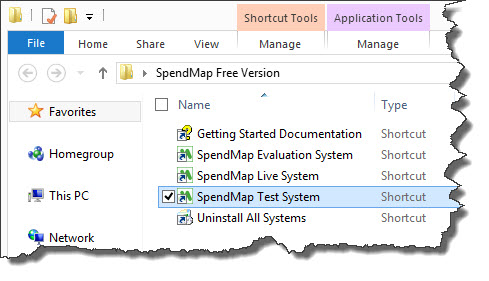
When you install the Free Version, you will get a folder in your Desktop called “SpendMap Free Version” with five shortcuts in it, one of which is the SpendMap Test System

free purchase order software shortcuts

To refresh the data in your Test System, just run that shortcut and you will be prompted for the location where your Live System is installed, so that it can be copied.  If you’re not sure, just log into your Live System, select the menu Help > System Information, and see #8 “Shared File Location”.

Reminder:  Use of the Test System is not always necessary.  You can also do testing in your Evaluation System, which is preloaded with sample data and the most popular settings.  That said, if you want to test something that might be affected by the settings or data in your Live System, then that’s what the Test System is there for.