How to enable modules in your Free Purchase Order Software

Update 07/29/2015:  Our Free Version now includes the Purchasing, Receiving and Email Integration modules.  Read the announcement here.

We’ve had a few Support Tickets from people asking about the message that you get when you try to access certain modules in the free version of SpendMap, stating “To use this feature, you need to enable the feature (or the entire module) in the Setup System area“.

enable-module in Free Purchase Order Software

Sometimes people misinterpret this message to mean that the feature or function is not available in our Free Version, when in fact it is and just needs to be turned on and/or configured.

All of the modules are enabled by default in the Evaluation Copy of SpendMap but in your Live Copy, some modules are disabled by default to improve system performance.  You can enable some of the modules during the Setup Wizard that runs automatically when you log into your Live (production) System for the first time, otherwise you can visit the Setup System menu group to enable them after-the-fact…

  • Main Purchasing Module (Purchase Orders) – Enabled automatically when you run the Setup Wizard.
  • Requisitions and Approvals – Does not need to be enabled (always turned on).  Just start entering requisitions when you’re ready.
  • Receiving – Can be enabled during Setup Wizard or with first check-box in…RECEIVING > Setup system > Receiving options
  • Invoice Approval – Must be enabled with first check-box in…INVOICE APPROVAL > Setup System > Invoice Options
  • Request For Quotation (RFQ) – Does not need to be enabled (always turned on).  Just start entering RFQs when you’re ready.
  • Inventory Control – Must be enabled with first check-box in…INVENTORY CONTROL > Setup system > Inventory options
  • Asset Management – Does not need to be enabled (always turned on).  Just start entering or purchasing assets when you’re ready.
  • E-mail Integration – Enabled by configuring the settings in …PURCHASING > Setup system > e-mail settings
  • Faxing – Due to licensing restrictions related to the third party fax technology that we use for this module, which limits the number of copies that we are allowed to distribute, the Faxing Module is not available in the Free Version of SpendMap.  Please consider using the E-mail Module instead.
  • PunchOut (e-commerce integration) – This web-based component is only available in the Paid Version of SpendMap.
Virus in SpendMap Free Version was False Alarm

Webroot virus scanning software was showing a “false-positive” on our website last week, saying that our site “Contains malicious content”, when it does not.  Webroot has since updated their database to show that SpendMap.com is totally safe.

Are you worried about viruses or malware in the free version of SpendMap?  These days you can’t be too careful when downloading files from the Internet.

And because of the popularity of the free version of SpendMap, our installation package (SETUP.EXE) has been picked up by many download sites, which we have no control over.

So if you’re worried about viruses and malware (as everyone should be these days), make sure to avoid these other download sites and get the installation package directly from our website.

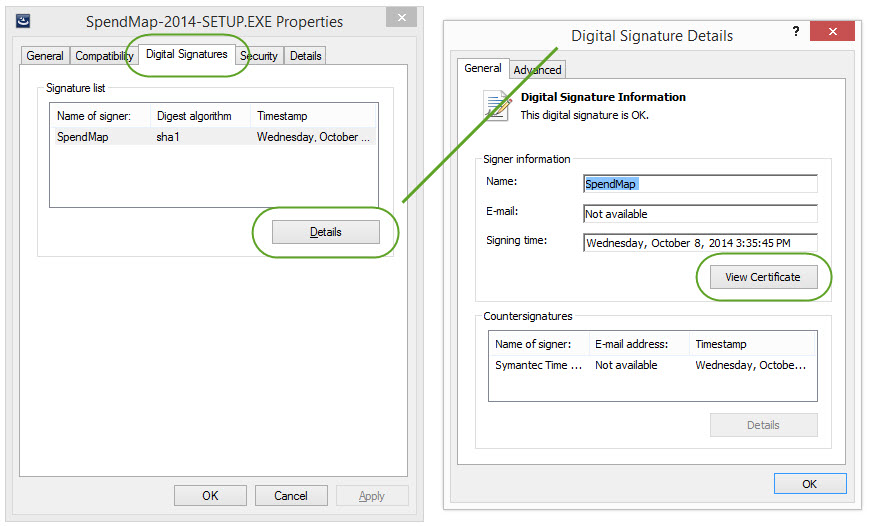
Before posting our installation file, we always scan it for viruses, malware, etc. using the latest version of Symantec’s Antivirus Software and then we sign it with a digital signature so you can tell if something happens to it on the way to you.  To check the status of the digital signature, you can RIGHT-mouse click on the SETUP.EXE file, select “Properties” from the menu, then click the [Digital Signatures] tab…

No Virus in SpendMap

Of course, you should scan any EXE files for viruses, etc. before running them, and you should follow your company’s security protocols when installing any software.

Retiring Last Year’s Free Purchase Order Software (v11.98)

It has been two months since we announced the upgrade for last year’s release of the free version of SpendMap, so now the time has come to officially stop supporting version 11.98.

Please upgrade to the latest release (v12.65).

If you’re not sure which version you are using, just select the menu HELP > ABOUT.

For instructions on how to update your system, from within SpendMap please select the menu HELP > CHECK FOR UPDATES.  This will not actually install the update.  Rather, if you are using the old version, this will expose a red hyperlink at the bottom of the Main Menu in SpendMap…just click the hyperlink to see full upgrade instructions.

The upgrade utility will bring forward all your data, history, settings, etc., so you will not lose any of your work in SpendMap.

Thanks,

The Free-Procurement Project Team
Totally FREE software that automates Purchase Orders and a whole lot more
Powered by SpendMap

3 More Reasons to use Free Purchase Order Software

happy purchase order software usersInteresting data from Spend Matters and American Productivity & Quality Center,

If we’re crunching the numbers correctly, automating your procure-to-pay process can:

  • Save up to 71% of the time it takes to process Purchase Orders
  • Increase the number of Purchasing transactions that each staff member can process by 186%
  • Reduce supplier lead time to receive orders by up to 9 days

As if you needed even more motivation to implement our Free Purchase Order Software.


Update for free Purchase Order System (accumulated fixes)

A patch has been posted to correct various minor issues in the free version of SpendMap.  Please select the menu HELP > CHECK FOR UPDATES from within SpendMap to update your system.

This is a “patch” only (i.e. not a full version upgrade), so it will not change your version number or change any features.

If you have any questions, please use our free support ticket system.

Regards,
– The Free-Procurement Project Team

PS.  Have you told anyone about us lately?  Please help spread the word.  Thanks!

Administrator Accounts and your Free Purchase Order Software

When installing the free Windows/desktop version of SpendMap or when applying full-version upgrades like the recent v11.98-12.65 upgrade, the instructions will refer to an “Administrator account”.  For example, the instructions might say something like “You will need Administrator privileges in Windows to complete the upgrade” or “You will need Administrator privileges on your computer to perform the installation“.

(more…)

Upgrade your Free Purchase Order Software to 2014 Release

If you are using last year’s release (v11.98), you can now upgrade your free version of SpendMap to the 2014 release (v12.65).  You can check your current version number using the menu Help > About.

The new release includes more than 30 new features and capabilities, in addition to various performance improvements.

The upgrade utility will bring forward all your data, history, settings, etc., so you will not lose any of your work in SpendMap.

Easier Upgrade Utility

Unlike last year when you had to run an external EXE to perform the v11.64-11.98 upgrade, you can now perform full-version upgrades from within SpendMap, using the menu HELP > CHECK FOR UPDATES.  However, it is a two-step process – first you need to select HELP > CHECK FOR UPDATES to download a patch to your v11.98 system that has the full-version upgrade capabilities built-in, then you need to select HELP > CHECK FOR UPDATES a second time to upgrade to v12.65.

To review complete details and instructions before actually upgrading your free Purchase Order Software, just select the menu HELP > CHECK FOR UPDATES from within SpendMap to download the patch, log back into the system, then follow the red hyperlink that you will see at the bottom of the Main Menu…

Upgrade your free PO Software

Best regards,

The Free-Procurement Project team
Totally FREE software that automates Purchase Orders and a whole lot more
Powered by SpendMap

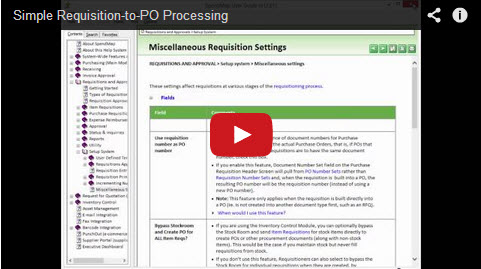
New Tutorial: Simple Requisition-to-PO Processing

We added a new feature in the 2014 Release to convert approved Purchase Requisitions into Purchase Orders, as soon as the last approval occurs, so you no longer have to run the Build PO Utility as a separate step.

We had a few requests for this feature from smaller companies that don’t have Purchasing Departments or dedicated Buyers (i.e. the Requisitioners are responsible for placing the orders once their Requisitions are approved).

The Tutorial also reviews a few other related features that are popular with smaller companies (and larger companies that have “end-user Purchasing”), so we rolled it all into this video, which we’re calling “Simple Requisition-to-PO Processing”.

Click the image below to watch the tutorial on YouTube, and don’t forget to visit our Channel to see 20 other video tutorials that will help you get started with the most popular features in your free Purchase Order system…

Tutorial: Simple Requisition-to-PO Processing

New 2014 Release (v12.6) is Now Available (new installations only)

We’ve updated the new system installation package for the free version of SpendMap (now called SpendMap-2014-SETUP.EXE).

The 2014 Release (version 12.6) includes 30 new features as well as performance and usability improvements.

If you need any help installing the software, please use our free support ticket system.

New Systems Only

This is for new installations only and cannot be used to update your system if you’re already using the Free version of SpendMap (the 2013 release, v11.9).

For those already using the system, we are working on an update utility to bring your system forward to the 2014 release.  The update utility will retain all your data/history, so you won’t lose any of your work when you upgrade.  Just follow this blog to be notified when the update utility is ready, which we expect will be in the next few weeks.

Free Purchase Order Software – new stuff coming soon!

New Version of SpendMapWe’re starting to roll out the 2014 release of SpendMap (v12.6), which includes more than 30 new features and capabilities.

We even added some new stuff just for the Free-Procurement Community, such as the ability to build Purchase Orders from approved Purchase Requisitions immediately as the last Approver completes their review (i.e. you no longer have to run the Build PO Utility as a separate step).  This will be more convenient for smaller companies that don’t have dedicated Buyers/Purchasing Managers who review orders before they go out the door.

Anyway, this is just a pre-announcement that more good stuff is coming your way.  We’re working on the updated installation package for new systems now, and then we’ll put together a v11.9 to v12.6 update for existing users, likely in the next couple/few weeks.