PO numbers by Ship-To location in your Free Purchase Order Software

Jody is using the free version of SpendMap to manage spending for a chain of bar/restaurants, and was wondering if there is a way to set up a separate sequence of PO numbers for each Ship-To location.

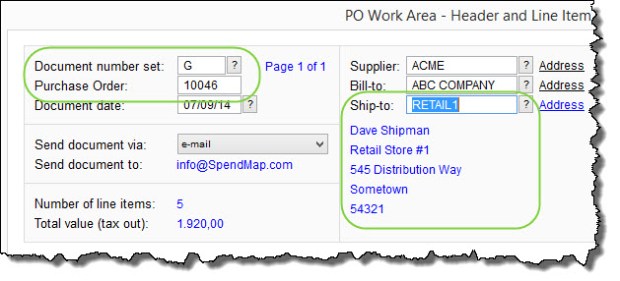
While there is no “direct” link between Ship-To locations and PO Number Sets, you can set up an indirect relationship by way of the user accounts.  That is, in the User Master File, you can 1) set up a default Ship-To for each user, and separately 2) assign each user a default PO Number Set.

If you do both those things for all users at a location, and assuming they don’t change the defaults when entering POs (and/or if you lock out those fields so that they cannot change from the defaults), then all POs for each Ship-To will also be for that PO Number Set…
PO-BY-SHIP-TO

Again, this is not a “hard relationship” (i.e. rule) in the software per se, it is simply one way to configure it.  That said, it seems to work well for most people who ask about this.

You can set up your Ship-To locations in here…
– PURCHASING > Master Files > Cost Centers > Add/Modify/Delete

You can set up your PO Number Sets in here…
– PURCHASING > Setup system > Incrementing document number sets > POs

You can specify the default Ship-To and PO Number Set for each user in the [Settings] Folder of the User Master File, in here…
– PURCHASING > User setup > Add/modify/delete users

And, if you want to, you can lock/restrict access to the PO Number Set field and/or the Ship-To field in the PO Work Area (so that users can’t change from their defaults), using this…
– PURCHASING > User setup > Field restrictions by user access level > Set field restrictions

Canadian Anti-SPAM Laws and your Free Purchase Order Software

spamAn update has been posted to align the free version of SpendMap with the new Canadian Anti-SPAM Laws (CASL), which come into effect next week.

In addition to restricting how companies can use e-mail to communicate with their customers and prospects, CASL includes additional rules for software, specifically how we must notify users when installing software or changing settings on their computers, collection of personal information, and so on.

While the new laws are only applicable to a small portion of our users (less than 10% are in Canada), the new laws are just good business practice in our opinion, so these new improvements will be in everyone’s system, not just our friends in Canada.

At your convenience, please select the menu HELP > CHECK FOR UPDATES from within SpendMap to update your system.

Once you do, you may see addition prompts/questions, whenever SpendMap goes to make changes to your computer (e.g. update the PDF printer driver, etc.).

As always, this “patch” will NOT update your version number or change any features.

If you have any questions, please use the free support ticket system.

Regards,
– The Free-Procurement Project Team

PS.  Have you told anyone about us lately?  Please help spread the word.  Thanks!


Using vs. Implementing your Free Purchase Order Software

needs-help

Brenda was struggling a bit with her implementation of the free version of SpendMap, so we helped her by providing free support when she had questions about setting up her Master Files, using the built-in integration tools, and otherwise configuring the system to her needs.

But she still had a concern…

I’m worried that if I’m having trouble, it will be impossible for our staff as they are not very computer savvy at all“.

Fair enough, but keep in mind that implementing a business application like this is more involved than just using it for your day-to-day work.  For example, entering a Purchase Order or Requisition in SpendMap is much easier than setting up the master files, going through system configuration, etc.

Our customers tell us all the time that their users can handle the “day-to-day” stuff, with no training at all!

And remember, with User Definable Menus, you can remove everything from your staff’s field of view that they don’t need, leaving only the few functions that they’ll use to do their daily tasks (e.g. Enter a PO or Requisition, check the status of their order, etc.).

But Brenda certainly has a valid point.  This type of system is definitely more involved to set up than, say, a simple word processor or something, that you can just install and start using.  There are configuration settings, workflow options, master files to populate, not to mention mapping the functionality to your business processes, which in and of itself can take some time.

All that said, keep in mind that there is definitely a big carrot to keep you motivated while you work get the system going.

On a separate but related note, we will soon be offering Getting Started training and implementation consulting packages for users of the free version (until now, these services were reserved for people using our paid version only).  Make sure to follow our Blog, where we’ll make the announcement when the Getting Started package is available.

Don’t give up folks.  Rome wasn’t build in a day.

Wasting Money is Scary for SMBs

FRIDAY-THE-13THWasting money is pretty scary for most small and medium size businesses.

It’s hard enough to run a profitable business these days, without having to worry about your staff spending money that they shouldn’t be.

Get control of your spending and see where the money is going, with SpendMap’s free Purchasing Management Software.

Happy Friday the 13th.


QuickBooks Integration for your Free Purchase Order Software

QuickBooks is the most popular Accounting system in use by the Free-Procurement community, so we thought we’d give you a little bonus gift with the 2014 release of SpendMap.

We’ve built direct integration with QuickBooks to push approved invoices (bills) and expense reimbursement transactions directly into your QuickBooks database, without the need for batch file exports and imports.

So, for example, once you have approved a supplier’s invoice for payment, SpendMap will create a pending Bill in QuickBooks, so you can cut a check to the supplier and post the transaction to your G/L, with no duplicate data entry.

Direct QuickBooks integration is coming soon, along with 20 or so other new features and capabilities, in the 2014 release of the free version of SpendMap.

SM_qb_logo

People are still skeptical of free Purchase Order Software

skepticalMore than two years into the Free-Procurement Project, we’ve given away more than 20,000 free Purchase Order systems to SMBs in over 100 countries, yet people are still skeptical.

Susan works in a Hospice in Florida, a non-profit organization helping families when they need it most.  Hers is exactly the type of organization that we’re trying to help with this Project.

Susan kindly responded to the survey that we send out a few weeks after people download the free software, and wrote…

The purchase orders are great. The problem I had was the inability to email the purchase orders out. I received error messages and determined that this software program really isn’t free.  The act of misleading the end user is what I was most disappointed in.

The message she is referring to says that the e-mail module needs to be set up, not that it needs to be purchased.  I think perhaps Susan must have had an underlying assumption that a totally free Purchase Order System, worth literally thousands of dollars, is too good to be true, which led her to jump to a wrong conclusion.

And Susan is not alone.  Despite our best efforts, people still think there’s a catch.

So for all you skeptics out there, I’m here to tell you that the free version of SpendMap it just that, totally free.

Trust is a pretty hard thing to earn on the Internet these days but we’re trying.

Message about NtSetReg.exe after indexing system

If you have installed the free version of SpendMap on your network server for multiuser access, after reindexing the system you may see a message about running NtSetReg.exe to update registry settings on the server.

This is just a reminder – you do NOT need to run NtSetReg.exe each and every time you index the system.

When you originally installed SpendMap, you would have run NtSetReg.exe to set those registry settings on the server. We display that reminder message after indexing 1) if SpendMap is able to read the registry on your server and it sees that the required registry settings are not in place, or 2) if your network security settings are such that SpendMap cannot read the registry on the server to confirm that the settings are in fact in place.

So, again, you do NOT need to run NtSetReg.exe every time you index the system.


100th Blog Post for the Free-Procurement Project

100th Blog PostThis is our 100th Blog post.

We’ve been working hard to give you helpful information for you to get the most out of the free version of SpendMap.  We want to help small businesses improve their Purchasing processes, with more than just free Purchase Order Software.

If you have any feedback for us or if you’d like to suggest a topic for an upcoming post, we’re all ears.

And if you like what we’re doing to help small businesses, please show your support for the Free-Procurement Project and help spread the word.

It has been fun working with you so far and we look forward to making more friends as we work on the next 100 posts…

– The Free-Procurement Project team.

Exporting Data to Excel from your Free Purchase Order Software

Aaron in California was looking for a report showing both the Base Unit of Measure as well as the Purchasing Unit of Measure for each item.

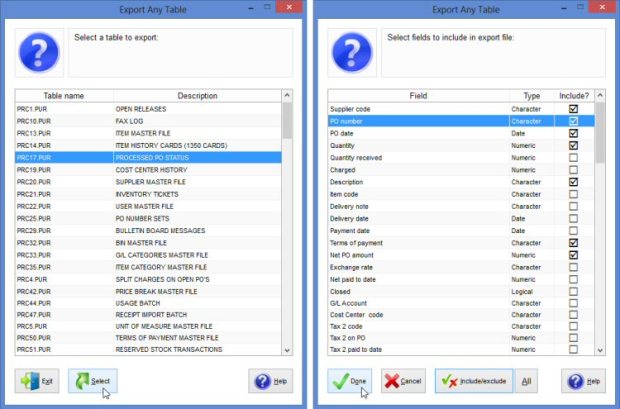
Since we don’t have a report like that, we pointed him to the following utility, where he can export his Item Master File (or any other data) to Excel, including whatever fields he needs…
– PURCHASING > Utility > Data Interfaces > Export any table

Aaron replied with “Yes this was helpful. I see how I can create an endless number of reports using this“, which got us thinking that this would be a good topic for a blog post.  Thanks for the inspiration, Aaron.

So while we put that utility under the “Interfaces” section (since it’s a “data extract” utility), by all means feel free to use Export Any Table for ad-hoc reporting if there’s something that you’re looking for that isn’t on one of the system’s 100+ built-in reports.

Export Any Table in PO Software