Fix for Testing Copy and PO Form margins in free version of SpendMap

We have corrected two minor problems in the free version of SpendMap…

  1. On some printers, Purchase Order forms were printing with no top and left margins, making the form appear off-center.  You can correct this simply by selecting the menu HELP > CHECK FOR UPDATES in SpendMap.
  2. When using the “Testing Copy” of SpendMap, which allows you to make a copy of your Live System for testing purposes, sometimes the copying procedure would fail with the message “Unable to delete files in ROOT folder”, after which the icon/shortcut to run the Testing Copy would fail to launch.  Unfortunately, if you experienced this issue, you will not be able to log into your Testing Copy to check for updates, so just submit a support ticket or send us an e-mail at free-procurement@spendmap.com and we’ll reply back with instructions for correcting the problem.  However, if you are able to log into your Testing Copy, please do so (without refreshing the data from your Live Copy) and select the menu HELP > CHECK FOR UPDATES, to avoid the issue going forward.

Sorry the inconvenience.

Best regards,

The Free-Procurement Project team
Totally FREE software that automates Purchase Orders and a whole lot more
Powered by SpendMap

Step-by-step Setup Guide for free Purchase Order Software

We’ve had a few requests for a step-by-step guide or video tutorial for setting up the free version of SpendMap.  Mostly we’re seeing that in the responses to the survey that we send out a couple of weeks after people download the free Purchase Order system.

Yes, we thought of that when we were putting together the video tutorials and other resources for the free version of SpendMap.  The problem is, each company will take different steps when setting up SpendMap, depending on their specific procurement processes and the features and modules of the system that they plan to use.

For example, some people just want to automate their Purchase Orders, while others want to automate Requisitions and approvals, POs, receiving, supplier invoice approval, and inventory control.  And even within each module, there are many features that you may or may not need, depending on how you manage your Purchasing.

In our experience, most people only use 20% or so of the features/functionality in this type of system.  The challenge is, the 20% that you need will be different than the 20% that someone else needs.

So unfortunately it just not practical to put together a generic, “one-size-fits-all” getting started guide that would work for everyone.

We did, however, create 20 or so video tutorials for you, which cover the most popular features that most people will likely need.

Also, the Online Help system has a Getting Started section for each of the primary modules, which appears as the first sub-section under each module…
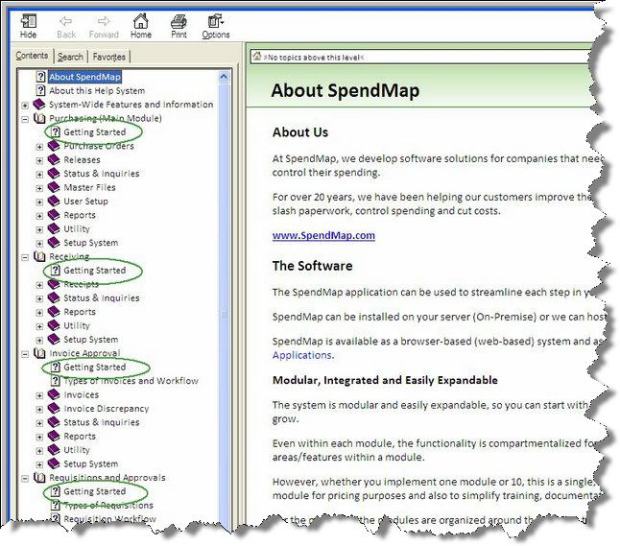
getting-started with free PO system

You might also want to take a look at the subsection “Time to Implement” in the Getting Started Documentation that came with your free software…that will point you in the right direction.

Thanks for your input!

Currency and Tax setup in free Purchase Order Software

We’ve had a few support tickets from folks in the United Kingdom, asking how to change the default currency in SpendMap from dollars ($) to pounds sterling (£).

The question usually comes alongside another question about how to set up Value Added Tax (VAT) as the default sales tax rate in the system.

So this blog post outlines the options for changing the default currency and taxes in the free version of SpendMap.  I’ll use “pounds” and “VAT” as the examples, but SpendMap supports other currencies and taxes too, which you can set up in the Tax and Exchange Rates Master File.

Setup Wizard

First things first, I guess I should mention that you will be prompted to select your currency and default taxes during the Setup Wizard, which will run automatically when you log into your Live (Production) copy of SpendMap for the first time.

If for some reason you want to change the currency or taxes in the Evaluation copy of SpendMap (the sample data in the Evaluation copy uses dollars ($) and a generic tax code of “TAX 1”), or if you just missed that part of the Setup Wizard the first time you ran your Live copy, keep reading to learn how to change the default currency and taxes after-the-fact…

(more…)

Upgrading your free Purchase Order Software is easier than you think

We had a couple support tickets from people using the free version of SpendMap in a multiuser/network environment, asking if they have to apply the recent update to each PC workstation.

No, you only need to run the update once, on the PC/workstation of your choice. All other workstations will be updated auto-magically when they run SpendMap the first time after the upgrade, at which time SpendMap will pull the new files down from the server to the individual PCs.

Please update your free Purchase Order system at your earliest convenience, as we would like to eventually stop supporting version 11.64.

Thanks!

Success Story: MCS Wins with Free Purchase Order Software

Managed Care Systems (MCS) was struggling to control their Purchasing, inventory and budgets with a patchwork of outdated systems.  Having grown to over 300 employees, MCS was overdue for an upgrade.  Unfortunately, there was no budget for a new e-procurement system, but that didn’t stop Eric Jeffers, who is responsible for the Purchasing Department at MCS.

“Our old system was written in-house a bunch of years back and it was starting to fall apart,” says Eric.  “The IT Department didn’t want to invest resources to fix it, so we kept limping along.  Plus, as an add-on to the Help Desk system, it was really just an over glorified word processor to start with; it could print a PO and keep some history, but there was still a ton of manual effort and duplicate data entry for each order, and it didn’t track inventory or provide any budget controls, which were big problems.  We were constantly going over budget because the managers who were approving orders couldn’t see the status of budgets real-time.  And we were running out of stock all the time, which meant a big panic, rush orders and extra charges for expedited deliveries”.

So when Eric found SpendMap with its real-time budget and inventory controls fully integrated with its world-class Purchasing functionality, he was optimistic to say the least.  “I have been working in Purchasing departments for 15 years and this is by far the best purchasing software I have ever seen,” says Eric.  “You can’t imagine how disappointed I was when I was told that we had no budget left for a new system and I had to wait until the following year”…

(more…)

It’s time to upgrade your Free Purchase Order Software

If you are still using last year’s release (v11.64), you can now upgrade your Free version of SpendMap to the latest release (v11.98).

The new release includes more than 20 new features and capabilities, in addition to various minor fixes and performance improvements.  Please update your system at your earliest convenience, as we will eventually stop supporting version 11.64.

The upgrade utility will bring forward all your data, history, settings, etc., so you will not lose any of your work in SpendMap.

For complete details and instructions for upgrading your system, please select the menu HELP > CHECK FOR UPDATES, then follow the red hyperlink that you will see at the bottom of the Main Menu in SpendMap.

Best regards,

The Free-Procurement Project team
Totally FREE software that automates Purchase Orders and a whole lot more
Powered by SpendMap

Supplier Pricing for Items in Free Purchase Order Software

Cathy in California asked why the pricing that she entered in the Standard Price and Standard Cost fields in the [General] Folder of the Item Master File weren’t copying over to new Purchase Orders, Requisitions and other documents.

Those fields are used for other purposes.  If you want pricing to default on new orders based on the selected item, you can set that up in the [Supplier] Folder of the Item Master File, where you can enter pricing from one or more suppliers, in addition to other related information such as freight charges, if that information is known in advance…

Supplier pricing in free Purchase Order Software

If you don’t want to enter separate pricing for each supplier, that is, if you just want to enter a single price to default on new POs regardless of who you are ordering from, then just enter “*” (an asterisk) for the supplier code, and the price will be used for all new Purchase Orders and other documents, regardless of the supplier.

TIP: If you ever change the price while entering a new Purchase Order, you can optionally update the Item Master’s default pricing right from the PO Entry Screen, so you don’t have to go back to the Item Master File to make the changes there as well.  To enable this feature, just use the “price update option” in here…
– PURCHASING > Setup system> Purchase Order settings > PO entry settings

Update for free Purchase Order System

An update has been posted to correct an issue in the free version of SpendMap whereby an “unregistered copy” watermark would print on Purchase Orders and other documents if the system was copied or moved to a different computer or restored from backup.

To correct this issue, just select the menu HELP > CHECK FOR UPDATES from within SpendMap to update your system.

If you have any questions, please use the free support ticket system.

Sorry for the inconvenience.

Update Server Offline Tuesday, March 26, 2013

The server that we use to distribute updates/patches for the Free Version of SpendMap will be offline Tuesday, March 26 between 6:00AM and 9:00AM Eastern Time.  You will not be able to download updates for your free Purchase Order Software during this window.

Sorry for any inconvenience this may cause.

Best regards,

The Free-Procurement Project team
Totally FREE software that automates Purchase Orders and a whole lot more

Windows 8 Support for Free Purchase Order Software

Windows 8The 2013 Release of SpendMap is here, with Windows 8 support and around 20 other new features.

So if you’ve been waiting for Win8 support before downloading your Free Purchase Order Software, the wait is over.  You can download the 2013 Release here.

New Systems Only

This is for new installations only and cannot be used to update your system if you’re already using the Free version of SpendMap (the 2012 release).

For those already using the system, we are working on an update utility to bring your system forward to the 2013 release.  The update utility will retain all your data/history, so you won’t lose any of your work when you upgrade.  Just follow this blog to be notified when the update utility is ready, which we expect will be in the next couple weeks.

More Firewall Friendly

We also made the 2013 release more firewall and proxy server friendly and reduced the frequency that the system checks for updates, so if you had any trouble getting it going before, you might want to give it another try now.

If you need any help, please use our free Support Ticket System.

Thanks.