Control Spending with a No PO No Pay Policy

When we first started offering the free Purchase Order Software a couple months ago, I did a blog post on the use of Purchase Orders as Step #1 on the path to controlling your company’s pending.

I didn’t set out to outline a three-step process for spend control but good things do come in threes, so here’s Step #2…

Once you have a reliable and efficient system in place for staff to request items and get them approved in a timely manner and you’re using Purchase Orders to keep track of your spending, the next thing you’ll have to work on is a way to get people to use the system.  User adoption is critical to the success of an e-procurement initiative.

There are countless ways to encourage user adoption of your new Purchasing System but if I had to pick one, it would be the No-PO-No-Pay Policy.

Basically, you inform all the parties involved (end-user requisitioners, the folks in Accounts Payable and, most importantly, your suppliers) that you will not pay invoices unless there is an approved Purchase Order for the goods or services.

Harsh?  Perhaps.  Difficult to enforce?  Sometimes.  Bound to be exceptions?  Maybe.

My goal for this blog post was not to give you all the ins and outs of implementing a No-PO-No-Pay Policy, but rather just to make you aware of it as an option to help control your company’s spending.

As it turns out, a good many organizations use policies like this, so maybe it will work for you.

If you would like to learn more, just Google “no PO no pay” and you’ll see lots of information and blog posts on this topic, like this one.

Stay tuned for “Step #3” in an upcoming post…

Importing items into free Purchase Order Software

I recently helped a Free-Procurement customer with importing his items into the Item Master File in SpendMap and I thought a couple of the tips I gave him would be useful for you as well.

What I’m going to outline here applies to importing most of the system’s Master Files, not just items…

(more…)

New SpendMap Website – update your free Purchase Order Software

Our new corporate website www.spendmap.com came online yesterday.

Many hyperlinks in your free version of SpendMap will now be broken.  You can wait for the next automatic update (could be up to 7 days) or you can select  HELP > CHECK FOR UPDATES  from the Main Menu to update your system immediately.

In addition to a fresh design and updated content, the new website now incorporates The Free-Procurement Project into our core SpendMap brand.

You can read the press release here.

Thanks for your patience as we make this transition.

I’d like to make a special shout-out to the team at i4 Solutions who I think did a great job on the site and were wonderful to work with during the whole process.  This is the second project we’ve done with i4 and I’d recommend them for website design and web-based application development.

I’d also like to thank Jeremy Miller at Sticky Branding for his advice at the outset of the project (the Free project, not the new website).  While we didn’t formally engage Jeremy on this project, we appreciate his generous advice and encouragement as we set out to learn about social media marketing and organizing large groups of people.  Thanks Jeremy!

D.

We put our money where our mouth is with free Purchase Order Software

It’s fitting, don’t you think, that you pay no money at all for this software that’s used to save you money (i.e. control your spending).

Talk about putting your money where your mouth is.

E-procurement software vs. Purchase Order Software: what’s old is new again

A dear friend recently gave my 7-year-old daughter an Etch A Sketch.  Yup, 50 years later, in this day of handheld video games, they’re still selling those things.

As I held it in my hand and tried to show her how to draw a flower (with a big line through it…I got stuck in a corner), it occurred to me that our old favorite has much in common with today’s handheld video games; compact, portable, small controls requiring dexterity, eye-hand coordination, progression, reward for time invested, etc.

Of course, it got me thinking about how e-procurement software technology has changed over the years.

(more…)

Too many options for users in free Purchase Order Software

(or “I don’t want my users seeing that”)

One of the most common topics of discussion we’ve been having in our free system setup/training sessions has been around user profiles and how to restrict users so that…

  1. they can’t do certain things in the system,
  2. they can’t see certain information, or
  3. just to make it easier for users that don’t need access to the entire system.

Most of you seem to be logging into the Evaluation Copy using the user ID with full access to all functionality (the user “FULL”), but this user profile, while convenient for evaluation purposes, would be unusual for a real user account in your Live/Production system.

Rather, you would likely set up restricted user profiles with access to only the areas of the system that each user needs.  This is especially true for “casual” (occasional) users like Requisitioners and Approvers that may have little or no training on the system, so you want to make it as easy as possible for them.

To learn now to customize each user’s profile, check out this video tutorial or read “About User-Definable Menus and Pop-Up Prompts” in the Online Help.

Free setup assistance for your free Purchase Order Software

We’ve had a few requests to help new users of the free Purchase Order Software with the setup (configuration) of the system.

Sure, we’re happy to help.

SpendMap includes an easy-to-use Setup Wizard and detailed online help, but if you’re in a hurry and don’t have time to read it, we would be happy to walk you through it.  Just send us a note at free-procurement@spendmap.com and we’ll set up a short meeting.  It should only take 15 or 20 minutes to get you set up and processing Purchase Orders.

We may not be able to provide this free service forever but we’ll try as long as we can until the user community gets too big.  Mind you, by then we’ll likely have a user forum in place, so you’ll be able to help each other at that point.

Hope to hear from you soon…

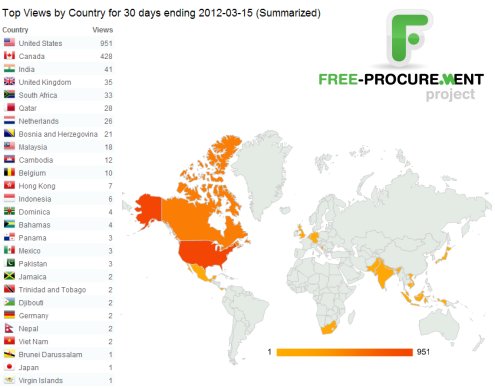
30 Day Results: The world loves free Purchase Order software

The results are in for the first month.  People all over the world are downloading our free Purchase Order Software. 

We’re getting some great questions from the early adopters who are already implementing the system and we’re getting ready to announce even more free stuff to help you say “Goodbye” to those paper Purchase Orders and frustrating manual Purchasing processes, once and for all.

So please keep the feedback coming and make sure to sign up for this Blog to stay in the loop.

The World Loves Free Purchase Order Software

When a PO is just a PO

We still see it from time to time; the 13-digit PO number.  You know, first you take an incrementing PO number, then you jam the date at the front, stick on the cost center or job number, and maybe sprinkle in the Buyer’s initials for good measure.

If you’re coming from a manual, paper-based process to manage your Purchase Orders, you wouldn’t be the only one to use your PO numbers for purposes other than identifying the order.  After all, when all you have to rely on to track your spending history is a filing cabinet, what other alternatives are there?

(more…)

How to get internal support for a full Purchasing Software System

We’re positioning the Free-Procurement Project as free “Purchase Order software” for a bunch of reasons that I won’t go into here but the free version of SpendMap actually includes all 12 modules, including requisitioning, receiving, supplier invoice approval, even inventory control and asset management.

If all you want to do is automate your Purchase Orders, that’s fine – just stick with the Purchasing Module.  The functionality is compartmentalized, so you don’t need to use all features/modules if you don’t want to.

But if you’re up for it, you can use SpendMap to automate everything from initial requisition all the way through to the approval of the supplier’s invoice and integration with your Accounts Payable system.  This is commonly referred to as “req-to-check” or “purchase-to-pay” (P2P for short).

If you intend to branch out into these other optional areas, however, you should be prepared to present a business case to decision makers and other departments that will be affected, such as the folks in Accounts Payable, department managers who will be approving orders online, perhaps even end-user staff members (requisitioners).

To help you get started building a business case, here’s a list of how e-procurement software can improve your business results at each step of the procurement process…

(more…)